

When to create another project
Create a separate project when you want to track:- Another language. A project’s language cannot be changed, so each language market needs its own project.
- Another brand. For example, a second product brand or, for agencies, a client.
- Another website. A brand with separate sites for different markets.
Switch between projects
The project switcher sits at the top of the sidebar and shows the current project’s name and language. Click it to pick another project. Every page then shows data for the project you selected.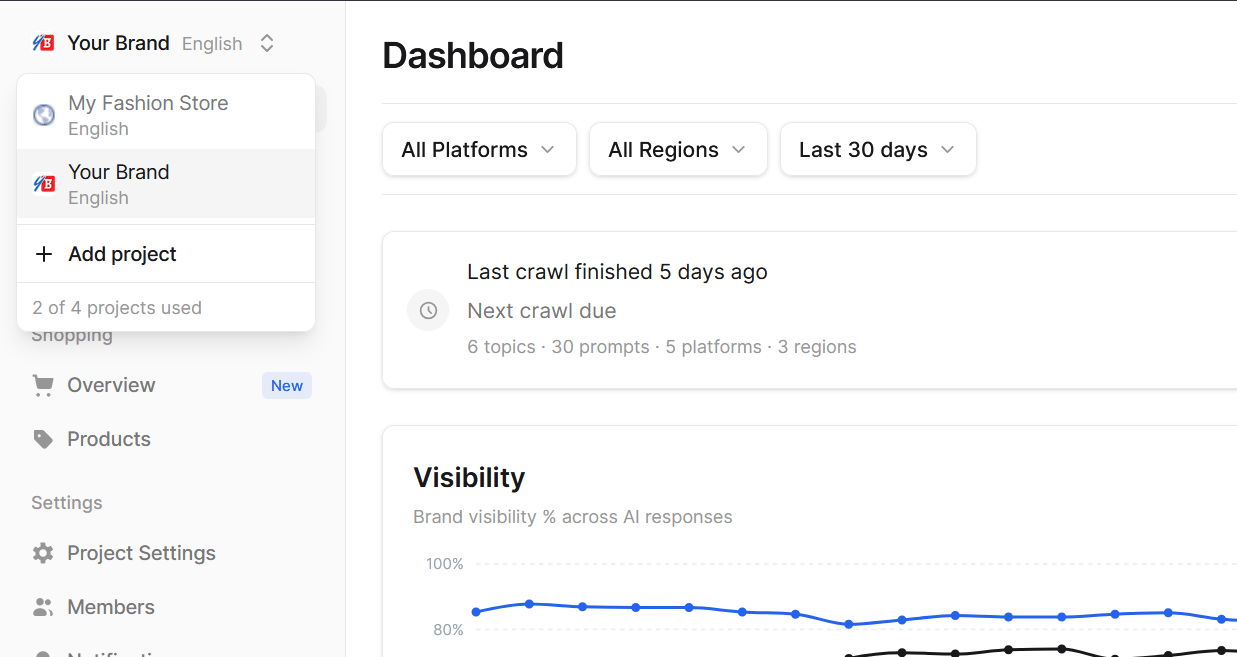
Add a project
- Open the project switcher and click Add project.
- Go through the setup wizard, the same way as for your first project. See Quickstart.
Prompts are shared across all projects in your organization. Adding a project does not add prompts to your allowance; it shares the same pool.
Pause and resume a project
Pausing stops all crawls for a project while keeping everything it has collected. Use it for a project you do not need to monitor for a while.- Open Project Settings > Project.
- In Project Status, click Pause Project.
Delete a project
Deleting removes the project and all of its data for good.- Open Project Settings > Danger Zone.
- Click Delete Project and type the project’s name to confirm.