

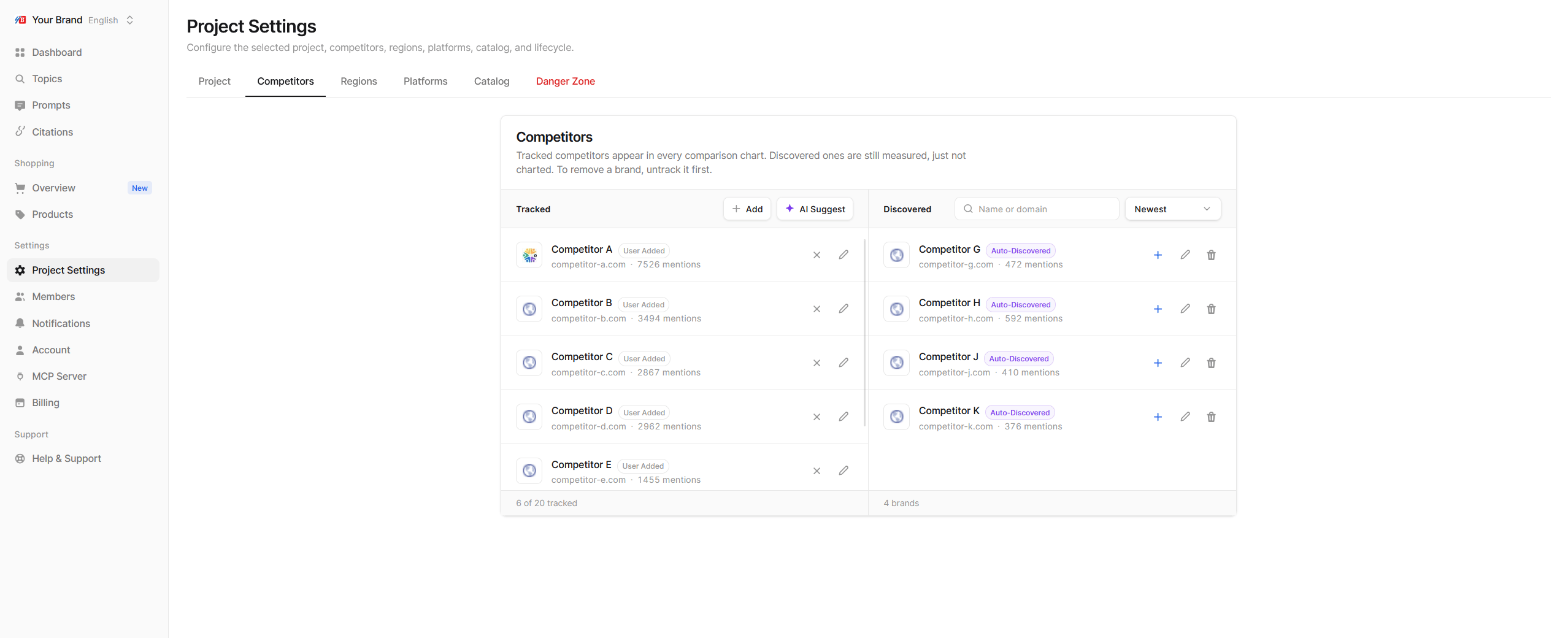
Tracked and discovered brands
The tab has two lists:
After each crawl, Echod adds newly found brands to Discovered. You can sort that list by Newest, Most mentions, Rising or Name A-Z, and search it by name or domain. Each row shows how often the brand was mentioned and how that compares with the previous period.
Add a competitor
There are three ways to start tracking a brand:- Promote a discovered brand. Find it in Discovered and move it to Tracked. This is the most reliable option, because Echod has already seen how AI platforms write its name.
- Add your own. Click add in the Tracked list and enter the brand’s name and domain.
- Use AI Suggest. Echod proposes competitors based on your brand profile. Pick the ones you want from AI suggested competitors.
Edit how a competitor is matched
Click a competitor to open its details:- Website: the competitor’s domain. It is matched as a suffix, so
shop.example.comalso counts asexample.com. Each website can belong to only one competitor. - Aliases: other spellings or names AI platforms use for the brand, such as abbreviations or former names. Type one and press Enter. Remove a spelling to stop counting it.
Untrack or remove a brand
- Untrack moves a brand back to Discovered. It stays measured but leaves your charts.
- Remove is only available in Discovered. To remove a tracked brand, untrack it first.
Choosing the right competitors
- Start with the brands you already compete with. These are the companies your buyers usually compare you against before they decide.
- Then add brands that AI answers keep naming. After the first few crawls, open Discovered and sort by Most mentions or Rising. AI platforms often name brands you might not see as competitors, such as marketplaces, review sites or adjacent tools. If a brand appears often, or more and more, buyers hear about it next to you.